FREE K-12 AI LITERACY COURSES FOR THE 26-27 SY! Learn more here.

Fundamentals of Computer Science
This course walks students through basic Python concepts within the context of game design. Students will also explore other topics such as the internet, digital citizenship, and data.
- HTML
- CSS
- Python
- Voyage
- Year
- 6th grade
- 7th grade
- 8th grade
- 9th grade
- 10th grade
- 11th grade
- 12th grade
- Texas course
Course Summary
This course includes coding exercises and practice on the Skill Struck platform as well as collaborative classroom activities, discussion points, supplemental material, and unplugged activities. Students learn the basics of Python and implement the concepts they learn by creating drawings, animations, and computer games. Students complete both a team and independent project to demonstrate their game design and Python skills. Along with these programming concepts, students will learn about digital safety, digital citizenship, computers, the internet, and more.
Course Outline
-
- Introduction to Python in Game Design Welcome to Python! This lesson gives a great introduction to Python programming and will get you up and coding in no time.
- Variables in Game Design Variables are an important part of programming. Let's find out how we can use them in this lesson.
- Input/Output in Game Design Games rely on input from the user to play the game. Learn how to take in an input and use it in your program!
- Network Topologies Learn how different layouts of networks can help information move more efficiently
- Addressing Learn how addressing works in the internet.
- Syntax & Comments for Game Design This lesson covers basic Python syntax and how to add comments to your code.
- Variable Types in Game Design There are lots of different ways that you can store data in Python. This lesson covers a few of those data types.
- Troubleshooting Learn some techniques to troubleshooting that can help identify the problem.
- Math in Game Design Learn how to use math with Python.
- Lists in Game Design Lists are one of the main ways that we organize data in most programming languages. This lesson covers how to use lists in Python.
- Error Messages & Debugging
- Modulus This lesson covers using modulus in Python. We will take a look at its usefulness including how to tell if a number is even or odd.
- If Statements in Game Design If statements allow you to decide what code should run depending on some conditions. This lesson will cover the basics on using if statements in Python.
- Conditionals in Game Design This lesson covers conditionals and how you can use them to compare data. We will also use if statements to execute code based on the conditionals.
- Else If Statements in Game Design Else If statements in Python allow you to add multiple if statements at once. The possibilities are endless!
- Functions in Game Design Functions are a great way to break up long sections of code and can be used multiple times without having to rewrite them.
- Rogue Access Points Learn what access points are and explore how someone might exploit them.
- While Loops in Game Design
- Programming Languages Learn about different programming languages, how they are used, and what they are used to build.
- Function Parameters in Game Design One of the great things about functions is that we can pass parameters to them and the function can handle the rest.
- Binary Learn the basics of binary--why it exists and how the computer uses it to communicate information.
- Representing Numbers with Binary Learn how to convert information into binary and back.
- Representing Text with Binary Learn how we use binary to represent text.
- Representing Images with Binary Learn how to use binary to represent images
-
- Pygame Basics Learn how to initialize a Pygame environment!
- Copyright Learn what we can and cannot use on the internet and why.
- Accessibility Learn about how we can make computer programs more accessible.
- Background for Drawing Shapes in Pygame Learn how to use Pygame to draw shapes that you would use in your games!
- Draw a Circle Learn more about how to draw a circle in Pygame!
- Data Compression Overview Learn what data compression is and how it is used.
- Lossless Text Compression Learn how we can compress text files in a way that they can be perfectly recreated.
- Draw a Rectangle Learn how to draw a rectangle in Pygame!
- Draw a Triangle Learn how to draw a triangle in Pygame!
- Draw a Straight Line Learn to draw a straight line in Pygame!
- Bigger Bytes Learn about the different sizes of data.
- Draw an Arc Learn how to draw an arc in Pygame!
- Data Learn how computers help us understand data sets.
- Draw a Smiley Face Practice drawing all the shapes you've learned so far in Pygame!
- Types of Computer Games Learn the basic types and categories of video games and discover examples of each.
- AI, Machine Learning, & Automation Learn how artificial intelligence, machine learning, and automation are affecting your world and potential changes in the future.
- Algorithms Discuss what an algorithm is and how they are used in creating video games.
- Random in Game Design Learn how to use random in generating games.
- The Digital Divide Learn what the Digital Divide is and how it affects people in different situations.
- Text on the Screen Learn how to add words to your screen!
- Timer Counting Up Learn how to create a timer for your games!
- Encryption Learn how encryption helps make things more secure.
- Timer Counting Down Learn how to add a countdown timer in Pygame!
-
- Escape Button Functionality Learn how to make the x in the top right corner work.
- Types of Threat Learn about the different approaches criminals might take cause problems.
- Animate Drawings Learn how to animate your drawings on Pygame.
- Computer Innovations Explore how different computer innovations have affected our everyday lives.
- Legal and Ethical Concerns in Innovations Learn about legal and ethical concerns surrounding computing innovations.
- Copyright Learn about the different laws surrounding creative works.
- Personal Data Learn how your personal data is available and could be without you knowing it!
- Bounce Your Drawings Learn how to bounce your drawings off the walls
- Move Drawing with Keyboard Learn how to move your drawing around the page with your keyboard.
- Move a Drawing with Mouse Learn how to move drawings around the screen with the mouse!
- Clicking the Mouse Event Learn how to have the game respond to a mouse click.
- Ping Pong Game Learn how to create the ping pong game using Pygame!
- Ping Pong Game Part 2 Finish creating the ping pong game!
- Ping Pong Game Improvements Learn how to make your Ping Pong game even better.
- Snake Game Learn how the game of snake works with Pygame.
-
- HTML Basics Learn the basic terminology and ideas behind HTML in this introductory lesson.
- Heading Tags This lesson will teach you how to use Headers to show hierarchy and style in your web pages.
- Text Colors Looking to spruce up your site with some color? This lesson focuses on how you can change the color of your text.
- Fonts Font families and sizes are the main topic in this lesson. There are many different combinations so have fun with it!
- HTML as a Language This introductory lesson addresses programming languages and a few of them that you will encounter in this unit and the next.
- HTML Structure Just like building a house, HTML needs to have structure. This lesson covers the basics of how to structure your HTML files.
- Background Color Background colors are a great way to show distinct sections in your site. This lesson covers the basics of how you can utilize this feature.
- HTML Title Titles are the cherry on top of every website. This lesson will cover how you can add this to your website for an even more personalized feel.
- Paragraphs Paragraph tags are one of the most common tags that you will use in HTML. Follow this lesson closely!
- Breaks and Dividers Break tags are one of the unique tags in HTML. This lesson covers how to use them and why they are different than most.
- Ordered Lists Lists are a great way to display multiple items. This lesson covers how to create numbered lists.
- Unordered Lists Similar to the previous lesson, this lesson covers how you can create a bulleted list.
- Text Align This lesson covers how you can align your text to the left, right and center of your website.
- Links This lesson discusses HTML links and how you can connect your users to external sites or internal pages on your website.
- Buttons/Event Listeners: onclick Finally some interaction! onclick is a great way to interact with your users.
- Images Another very useful and common element in a website is the image tag. Check this lesson out to learn how to use them.
- Background Image Background Images can be a great way to add more vibrance and texture to your website.
- Videos Videos are one of the most popular media types in the world right now. This lesson will teach you how to utilize this important feature.
- HTML Project # 3: Success Skills This is the success skills project.
- Image Link Image links can be a cool, useful way to let your users interact with your site.
-
- Introduction to CSS Learn how to get started with the CSS language!
- Connecting Your CSS File to an HTML File Learn how to connect your CSS file to an HTML file.
- Text Shadow Learn how to give HTML text a shadow with CSS!
- Rounded Corners Why have sharp corners when you can make them round? This lesson will cover the basics of using border-radius to add some smoothness to your site.
- Box Shadow Box Shadow is a great way to add some depth to your site. Let's learn how this is accomplished.
- Color Gradient Color gradients are a great way to blend two colors together and add some more flair to your page. Let's see how they are implemented.
- HTML Project # 5: Favorite Movie This is the favorite movie project.
- Comments in HTML/CSS Comments are a great way to make your code more readable for yourself and others. Let's see how we can implement them in HTML and CSS.
- Classes As your page grows, classes make it easy to assign CSS to certain elements in your site. This lesson tackles how to use classes and their importance.
- Color Picker Millions of colors exist and sometimes it's hard to choose which one you want to use, or how to even find it. Let's learn how we can more easily find colors and use them in our website.
- Margin and Padding Space is just as important as content on a website! This lesson covers the different ways to add space to your page.
- Pseudo Selectors This lesson covers pseudo selectors, which is a great way to add in some interaction to your site.
- Opacity Sometimes, you want your images to be partially transparent. Let's learn how to utilize opacity to accomplish this.
- Div Tags One of the most common ways to group together elements is using div tags. Let's check out how we can implement them.
- Button Design Learn the CSS styles and best practices for styling a professional looking button.
- List Styles HTML Lists don't have to be boring! Let's spruce them up a bit.
- CSS Icons Add CSS Icons to your website using Material Icons.
- Borders Learn to add a stylized border to an HTML element! Including images, shapes, and buttons. Customize the border color, width or style.
- Positioning This lesson discusses CSS Positioning and how it can be used to adjust the location of elements.
- Media Queries Intro Cellphones and tablets are more popular now than ever before! Let's look at how we can adjust our site depending on the width of the screen it is viewed on.
- Background Image Style Similar to the background image lesson that was covered in the HTML 1 Unit, we will learn how to use background images in CSS to style your page.
- Crowdsourcing Learn how collaboration affects computer innovations.
-
- Team Members in Tech
- Software Engineer Learn what it means to be a software engineer!
- Computer Systems Manager Learn what it means to be a computer systems manager!
- Database Administrator Learn what it means to be a database administrator!
- Network Analyst Learn what it means to be a network analyst!
- Video Game Developer Learn what it means to be a video game developer!
- Bioinformatic Scientist Learn what it means to be a bioinformatic scientist
- Drone Software Engineer Learn what it means to be a drone software engineer!
- Computer Science Teacher Learn what it means to be a computer science teacher!
- Virtual Reality Specialist Learn what it means to be a virtual reality specialist!
- Hardware Engineer Learn what it means to be a hardware engineer!
- Web Developer Learn what it means to be a web developer!
- Information Security Analyst Learn what it means to be an information security analyst!
- Health Information Technician Learn what it means to be a health information technician!
- Data Scientist Learn what it means to be a data scientist!
- Software Tester Learn what it means to be a software tester!
- App Developer Learn what it means to be an app developer!
- Artificial Intelligence Specialist Learn what it means to be an Artificial Intelligence Specialist!
- Ethical Hacker Learn what it means to be an ethical hacker!
- Web Designer Learn what it means to be a web designer!
- Agricultural Engineer Learn what it means to be an agricultural engineer!
- Marine Scientist
- Food Scientist
- Ecologist Learn what it's like to be a ecologist!
- Climatologist
- Biometrician
- Remote Sensing Specialist
-
- HTML Project # 1 Basic Web Practice This is the basic web practice project.
- HTML Project # 2: History Website This is the history website project.
- HTML Project # 4: Favorite Holiday This is the favorite holiday project.
- HTML Project # 6: Book Report This is the book report project.
- HTML Project # 7: Historical Figure Report This is the historical figure report project.
- HTML Project # 8: Music History This is the music history project.
- HTML Project # 9: Cereal Website This is the cereal website project.
- HTML Project # 10: Olympics This is the olympics project.
Standard Alignment
CSTA K-12 Computer Science Standards
- 2-AP-10
- 2-AP-11
- 2-AP-12
- 2-AP-13
- 2-AP-14
- 2-AP-15
- 2-AP-16
- 2-AP-17
- 2-AP-18
- 2-AP-19
- 2-CS-01
- 2-CS-02
- 2-CS-03
- 2-DA-07
- 2-DA-08
- 2-DA-09
- 2-IC-20
- 2-IC-21
- 2-IC-22
- 2-IC-23
- 2-NI-04
- 2-NI-05
- 2-NI-06
- 3A-AP-13
- 3A-AP-14
- 3A-AP-15
- 3A-AP-16
- 3A-AP-17
- 3A-AP-18
- 3A-AP-19
- 3A-AP-20
- 3A-AP-21
- 3A-AP-22
- 3A-AP-23
- 3A-CS-01
- 3A-CS-02
- 3A-CS-03
- 3A-DA-09
- 3A-DA-10
- 3A-DA-11
- 3A-DA-12
- 3A-IC-24
- 3A-IC-25
- 3A-IC-26
- 3A-IC-27
- 3A-IC-28
- 3A-IC-29
- 3A-IC-30
- 3A-NI-04
- 3A-NI-05
- 3A-NI-06
- 3A-NI-07
- 3A-NI-08
- 3B-AP-08
- 3B-AP-09
- 3B-AP-10
- 3B-AP-11
- 3B-AP-12
- 3B-AP-13
- 3B-AP-14
- 3B-AP-15
- 3B-AP-16
- 3B-AP-17
- 3B-AP-18
- 3B-AP-19
- 3B-AP-20
- 3B-AP-21
- 3B-AP-22
- 3B-AP-23
- 3B-AP-24
- 3B-CS-01
- 3B-CS-02
- 3B-DA-05
- 3B-DA-06
- 3B-DA-07
- 3B-IC-25
- 3B-IC-26
- 3B-IC-27
- 3B-IC-28
- 3B-NI-03
- 3B-NI-04
- Aligned to 37 Texas standards
- Aligned to 1 Utah standards
State standards documents
| Document | Standards | Grades |
|---|---|---|
| National | ||
| 2022 Skill Struck Standards Alignment + Correlation Guide | CSTA K-12 Computer Science Standards · 2022 | K-2, 3-5, 6-8, 9-12 |
| Alabama | ||
| Alabama Course of Study Digital Literacy and CS Standards + Skill Struck Alignment | Alabama Course of Study Digital Literacy and CS Standards | K-2, 3-5, 6-8, 9-12 |
| Arizona | ||
| Arizona Computer Science Standards + Skill Struck Alignment | Arizona Computer Science Standards | K-2, 3-5, 6-8, 9-12 |
| Arkansas | ||
| Arkansas Computer Science and Computing Standards High School Programming + Skill Struck Alignment | Arkansas Computer Science and Computing Standards High School Programming · 2023 | 9-12 |
| Arkansas Computer Science and Computing Standards Middle School Introduction to Coding Standards + Skill Struck Alignment | Arkansas Computer Science and Computing Standards Middle School Introduction to Coding Standards · 2023 | 6-8 |
| California | ||
| California K-12 CS Standards + Skill Struck Alignment | California K-12 CS Standards | K-2, 3-5, 6-8, 9-12 |
| Georgia | ||
| Georgia Standards of Excellence for K-8 Computer Science + Skill Struck Alignment | Georgia Standards of Excellence for K-8 Computer Science | K-2, 3-5, 6-8 |
| Idaho | ||
| Idaho Content Standards Computer Science + Skill Struck Alignment | Idaho Content Standards Computer Science · 2023 | K-2, 3-5, 6-8, 9-12 |
| Illinois | ||
| Illinois Computer Science Standards + Skill Struck Alignment | Illinois Computer Science Standards · 2022 | K-2, 3-5, 6-8, 9-12 |
| Indiana | ||
| Indiana K-12 Computer Science Standards + Skill Struck Alignment | Indiana K-12 Computer Science Standards · 2023 | K-2, 3-5, 6-8, 9-12 |
| Iowa | ||
| Iowa Computer Science Standards + Skill Struck Alignment | Iowa Computer Science Standards | K-2, 3-5, 6-8, 9-12 |
| Kansas | ||
| Kansas CS Standards P-12 + Skill Struck Alignment | Kansas CS Standards P-12 · 2023 | K-2, 3-5, 6-8, 9-12 |
| Kentucky | ||
| Kentucky Academic Standards for Computer Science + Skill Struck Alignment | Kentucky Academic Standards for Computer Science · 2023 | K-2, 3-5, 6-8, 9-12 |
| Maryland | ||
| Maryland K-12 CS Standards + Skill Struck Alignment | Maryland K-12 CS Standards · 2023 | K-2, 3-5, 6-8, 9-12 |
| Massachusetts | ||
| Massachusetts Digital Literacy and Computer Science Standards + Skill Struck Alignment | Massachusetts Digital Literacy and Computer Science Standards · 2023 | K-2, 3-5, 6-8, 9-12 |
| Michigan | ||
| Michigan K-12 Standards Computer Science + Skill Struck Alignment | Michigan K-12 Standards Computer Science · 2023 | K-2, 3-5, 6-8, 9-12 |
| Mississippi | ||
| Mississippi College and Career Readiness standards for Computer Science + Skill Struck Alignment | Mississippi College and Career Readiness standards for Computer Science · 2022 | K-2, 3-5, 6-8, 9-12 |
| Missouri | ||
| Missouri K-12 Computer Science Performance Standards + Skill Struck Alignment | Missouri K-12 Computer Science Performance Standards · 2023 | K-2, 3-5, 6-8, 9-12 |
| Nebraska | ||
| Nebraska K-12 Technology Standards + Skill Struck Alignment | Nebraska K-12 Technology Standards · 2023 | K-2, 3-5, 6-8, 9-12 |
| Nevada | ||
| Nevada Academic Content Standards for CS + Skill Struck Alignment | Nevada Academic Content Standards for CS | K-2, 3-5, 6-8, 9-12 |
| Nevada Academic Content Standards for Integrated Technology + Skill Struck Alignment | Nevada Academic Content Standards for Integrated Technology | K-2, 3-5, 6-8, 9-12 |
| Nevada Computer Science Standards + Skill Struck Alignment | Nevada Computer Science Standards | 9-12 |
| New Jersey | ||
| New Jersey Computer Science and Design Thinking Standards + Skill Struck Alignment | New Jersey Computer Science and Design Thinking Standards · 2020 | K-2, 3-5, 6-8, 9-12 |
| New York | ||
| New York Computer Science and Digital Fluency Learning Standards K-12 + Skill Struck Alignment | New York Computer Science and Digital Fluency Learning Standards K-12 | K-2, 3-5, 6-8, 9-12 |
| North Carolina | ||
| North Carolina K-12 CS Standards + Skill Struck Alignment | North Carolina K-12 CS Standards | K-2, 3-5, 6-8, 9-12 |
| Ohio | ||
| Ohio's Learning Standards Computer Science + Skill Struck Alignment | Ohio's Learning Standards Computer Science · 2023 | K-2, 3-5, 6-8, 9-12 |
| Oklahoma | ||
| Oklahoma Academic Standards for Computer Science + Skill Struck Alignment | Oklahoma Academic Standards for Computer Science | K-2, 3-5, 6-8, 9-12 |
| Rhode Island | ||
| Rhode Island's K-12 CS Education Standards + Skill Struck Alignment | Rhode Island's K-12 CS Education Standards | K-2, 3-5, 6-8, 9-12 |
| South Carolina | ||
| South Carolina Computer Science and Digital Literacy Standards + Skill Struck Alignment | South Carolina Computer Science and Digital Literacy Standards · 2023 | K-2, 3-5, 6-8 |
| South Carolina's Computer Science Standards for High School + Skill Struck Alignment | South Carolina's Computer Science Standards for High School · 2023 | 9-12 |
| Tennessee | ||
| Tennessee K-12 Computer Science State Standards + Skill Struck Alignment | Tennessee K-12 Computer Science State Standards · 2023 | K-2, 3-5, 6-8, 9-12 |
| Texas | ||
| TEKs Skills for CTE + Skill Struck Alignment | TEKs Skills for CTE | 9-12 |
| TEKs Technology Applications K-8 Standards + Skill Struck Alignment | TEKs Technology Applications K-8 Standards | K-2, 3-5, 6-8 |
| Utah | ||
| Utah 6-12 CS Standards + Skill Struck Alignment | Utah 6-12 CS Standards · 2019 | 6-8, 9-12 |
| Virginia | ||
| Virginia K-12 CS Standards + Skill Struck Alignment | Virginia K-12 CS Standards · 2023 | K-2, 3-5, 6-8, 9-12 |
| Washington | ||
| Washington K-12 CS State Learning Standards + Skill Struck Alignment | Washington K-12 CS State Learning Standards | K-2, 3-5, 6-8, 9-12 |
| Wisconsin | ||
| Wisconsin Standards for Computer Science + Skill Struck Alignment | Wisconsin Standards for Computer Science · 2023 | K-2, 3-5, 6-8, 9-12 |
| Wyoming | ||
| Wyoming Computer Science Content Standards + Skill Struck Alignment | Wyoming Computer Science Content Standards · 2020 | K-2, 3-5, 6-8 |
Course Project
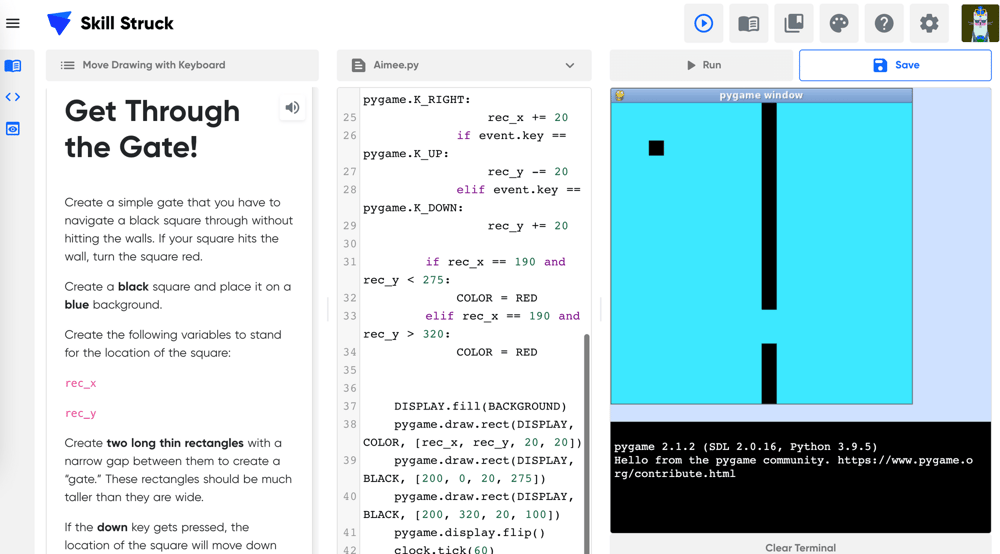
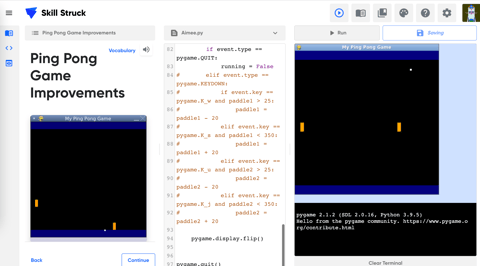
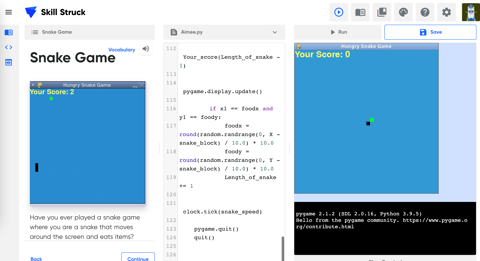
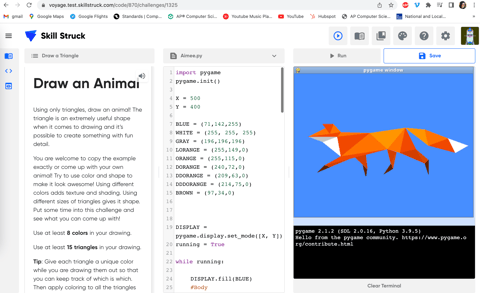
In this course students will complete challenges that help solidify concepts as they use skills in a variety of ways. In order to complete tasks, students will creatively apply what they've learned by using different approaches to reach a goal. This experience closely follows challenges they would face in a technical interview, allowing them to practice. Some examples of projects: Get Through the Gate, Ping Pong, Snake, Draw an Animal, Solar System
-
Fundamentals of Computer Science -
Fundamentals of Computer Science -
Fundamentals of Computer Science -
Fundamentals of Computer Science -
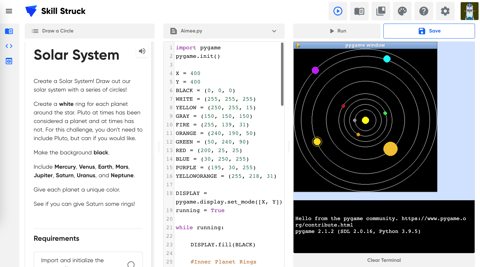
Solar System


